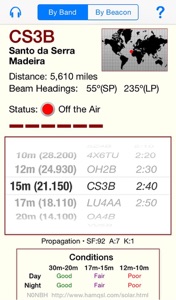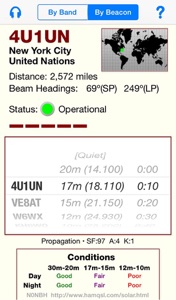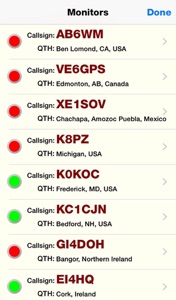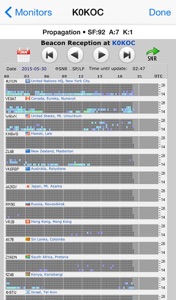

Tap a monitor station in the list to view the current web page for that monitor station without leaving BeaconAid-HF (wireless Internet connection is required). Use familiar iPhone/iPad web page gestures to zoom or pan around the pages.
You also see the latest solar flux, A-index, and K-index values as retrieved directly from the National Oceanic and Atmospheric Administration (NOAA). The home pages also display current condition calculations from the popular N0NBH propagation web site.
View Monitor Reports Inside BeaconAid
Tap the headphones icon (or “Monitors” button on the iPad) to see a list of active official beacon monitor stations around the globe. The monitor station closest to you is listed at the top. Current operational status (as retrieved dynamically from a central server) is shown by indicator light. Use these monitors to see where the bands are open, even in locations far away.
As monitor stations join or leave the network, BeaconAid-HF retrieves updated lists from the internet automatically — you don’t have to download an updated App Store version.
Locate the Nearest Monitor Station
Store the five beacon frequencies in your radio’s memories (or tune each band’s VFO to those frequencies). Choose the “By Beacon” view and select the beacon nearest the desired DX location. Then watch for the beacon to start transmitting on 20 meters (the right two columns adjust themselves in sync with the beacon network). As the beacon moves to higher frequencies each 10 seconds, select the next receiver memory (or VFO). If you hear the beacon on any band, you know the band is open between you and the beacon location.
Find the Band Opening to the DX
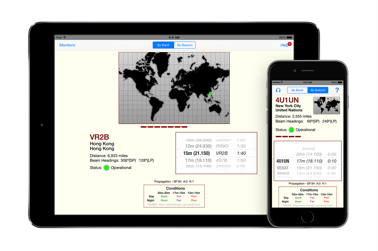
Set your receiver mode to CW and tune your receiver to the beacon frequency for a band you select in the left column. Listen for the next three minutes as each beacon transmits (within in a 10-second window) its callsign and one-second tones at 100, 10, 1, and 0.1 watts. As each beacon transmits, you see details of its location, distance, beam headings (short and long paths), and operating status. When you hear the beacon, you know the band is open to that world location.
BeaconAid-HF retrieves current beacon status information from the internet automatically.
Check Conditions for One Band

Send bug reports, suggestions, or anything else you’d like to say about this program to me at:
Notes, Comments, Field Reports
The Northern California DX Foundation (with the International Amateur Radio Union) operates a global network of 18 beacon transmitters designed to help HF radio users determine propagation conditions on the 20, 17, 15, 12, and 10 meter bands (14-28 mHz). Cycling through all transmitters and all bands within three-minute blocks, the network reveals band openings around the clock. Beacons identify with 22 wpm Morse code, but BeaconAid-HF takes all the guesswork out of knowing which beacon you’re hearing at any given moment.
About the Beacon Network
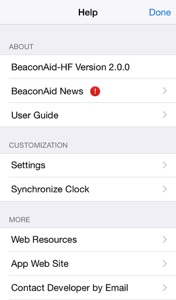
In addition to providing built-in help summaries, BeaconAid’s Help menu screen includes links to additional web resources (including the DXSummit’s Last 50 HF DX spots, all viewable within the BeaconAid-HF app), updated app news sent by the developer, user preferences, and a clock synchronization screen.
User preferences allow you to set whether the distances displayed for beacons are shown in miles or kilometers.
Access Help and Preferences
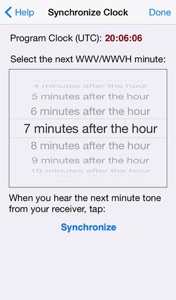
In case your iPhone or iPad clocks are not in perfect sync with WWV, you can set BeaconAid’s program clock to make the correction. Choose the minute setting to be announced next by your radio time signal (WWV, WWVH, CHU, etc.). At the sound of the tone for that minute, tap the “Synchronize” button. The rollers for the main By Band and By Beacon views will turn just as the beacon in the next 10-second cycle begins.
(Don’t worry: The program does not touch your device’s system clock. That wouldn’t be nice.)
Synchronize with WWV

Tue, 2 Jun 2015. Version 2.0 is now available for download. It features an updated user interface and full iPad support. iOS 7 or later required.
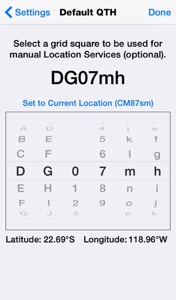
If your device does not have Location Services available (e.g., you’ve carried your iPhone out of its service area or you’ve taken your iPad with you to the hinterland), you have the option of manually entering a grid square location that the app uses for distance and beam heading calculations. As you spin the grid square dials, the latitude and longitude are displayed, in case those measures are more convenient for you.
Automatic or Manual Location