Tue, 21 May 2013. It appears that some users would rather leave a one-star review than contact me to resolve a problem. Developers do not have any way to contact individuals who leave App Store reviews, so I can’t help you unless you use the email address above to inquire and begin a dialog. As for crash problems a few users have experienced with the upgrade, removing and reinstalling the app (a free download) might take care of it. As I write this (after thousands and thousands of upgrade downloads), no version 2.3 crash logs have shown up for me to diagnose issues, so I do not believe this to be a widespread problem. Many happy upgraders have written to tell me how much they like the new version. So, c’mon folks: Drop me a line before you drop a review bomb.
Fri, 17 May 2013. Version 2.3 is now available on the App Store. Download/update today!
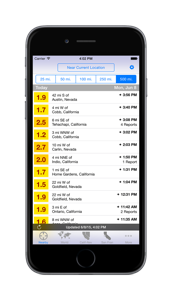
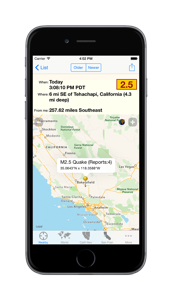
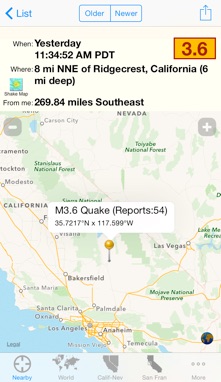
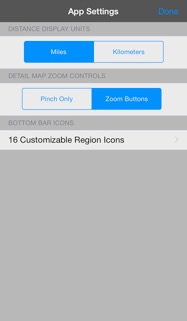
Wed, 15 May 2013. Version 2.3 has been submitted to the App Store for approval. The update not only restores data for all regions, but you get a full 7 days of data with pretty snappy performance. It also includes support for iPhone 5 screens, easier roadmap/satellite view switching, and expanded geographies for Los Angeles, San Francisco, and Seattle metro regions (I am the ruler of regions now). This was more of an emergency repair, so many planned new features are still on the to-do list.
The one downside to this upgrade is that it requires iOS 5.0 or later. I know there are still long-time users out there with early devices that cannot be upgraded to a modern iOS version. iTunes should remember your purchase and give you a free upgrade if you get a chance to migrate to a newer device. As a minor consolation the World region should continue to work for you and show you events of magnitude 2.5 or greater in the U.S.
Wed, 8 May 2013. Due to the elimination of a primary data feed, the app is currently not available in the App Store. An update is in the works.
Mon, 2 Jul 2012. Version 2.2.5 has been released. It restores the listings for the northwestern U.S. regions.
Fri, 2 Dec 2011. The data feeds dedicated to the Northwest U.S., Seattle, and Mt. St. Helens regions are unfortunately no longer available. You can still limit the listings to the region via the Nearby region.
Sat, 18 Dec 2010. Users running iOS 4.2 in iPhones may notice that the email sending feature doesn’t include the map portion in the image attachment — only the pin(s). This has been fixed in development versions and will be released as part of the next upgrade.
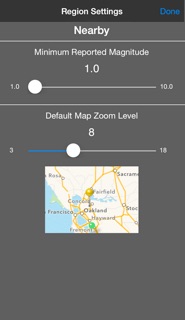
Wed, 7 Jul 2010. Looking for a recent big event that doesn’t appear in a region list? That’s because there have been so many small aftershock or related events that the large event has scrolled off the bottom of the list. Adjust the minimum reported magnitude for the region to view events further back in time. From any region list:
-
✦Tap the gear icon (upper right).
-
✦Tap “Region Settings.”
-
✦Adjust the magnitude slider to 2.0 or 3.0.
-
✦Tap “Done”.
Each region remembers its own minimum magnitude setting.
Sun, 27 Jun 2010. Announcing the release of version 2.2.4, a maintenance release containing enhancements for iOS 4, especially the Fast App Switching feature.
Tue, 11 May 2010. Version 2.2.3 with the fix for new USGS data feeds that iFeltThat uses for the California-Nevada, Los Angeles, San Francisco is now live.
Fri, 15 Jan 2010. Version 2.2 is now available for download. In response to the recent high seismic activity, the app shows more earthquakes by default over a longer time period.
Sat, 28 Nov 2009. Version 2.1 has been approved. News items are delivered directly to users inside the app, so going forward, this area of the web page will focus on items of interest to prospective iFeltThat buyers. When this internal news feature reaches my other app, my @iappsbydannyg Twitter posts will be more developer-oriented. I still look forward to hearing from users (you can email me from inside version 2.1).
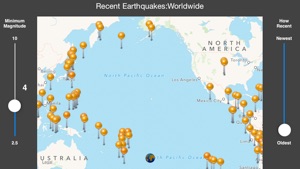
Mon, 26 Oct 2009. Allow me to comment briefly about the “Ring of Fire” map issue mentioned by one reviewer and an email correspondent recently. Maps cannot display the entire Pacific Ocean at one time, making it impossible to view the west coast of North America, Alaska, Japan, Philippines, Indonesia, and New Zealand all at once, no matter how much you pinch a map. Unfortunately, this is a built-in limitation to the Google map facilities that the iPhone OS currently provides to us developers. In fact, the same problem exists on the Maps app on your device: The world stops at 180 degrees and does not loop around. Columbus’ detractors would be so happy. Until the map infrastructure is improved to fix this, I’m afraid we’re all stuck.
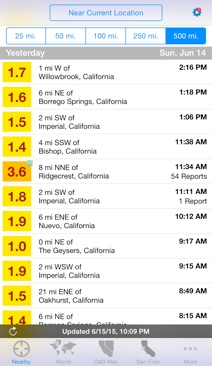
Sat, 17 Oct 2009. If you live in the Los Angeles, San Francisco, or Seattle areas, I recommend that you rely on the “Nearby” region as your primary source, rather than a metro-specific region (e.g., “Los Angeles”) as defined by the USGS. The USGS region’s western edge for Los Angeles, for instance, is just west of downtown Westlake Village, which means the region doesn’t include places like Oxnard, epicenter of a 3.2 temblor Friday night; likewise, the San Francisco region doesn’t extend far enough south to cover Loma Prieta, even though we know that an earthquake centered down there can have a significant impact on the metro San Francisco area. The “Nearby” region is not limited by the arbitrary USGS region structure, but rather covers an area based on the distance (radius) from any designated center point (such as the Current Location). You’ll get a much better snapshot of surrounding activity from the “Nearby” region, especially if you live on the edge of a USGS metro region and you feel a quake whose epicenter lies outside of that region.
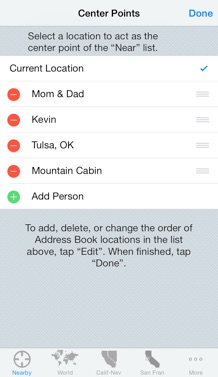
Fri, 2 Oct 2009. If you want to focus on all the activity around Keeler, CA, you can do it easily in iFeltThat. Assuming you don’t already have an entry for someone in this sparsely-populated part of California, begin by creating a new contact in your Address Book for the Lone Pine Chamber of Commerce, PO Box 749, Lone Pine, CA 93545. Then go to the Nearby region in iFeltThat and tap the wide button at the top (“Near ...”). Add the Lone Pine CoC to your list of centerpoints. After you tap “Done,” choose that centerpoint from the list. Restrict the radius to just 25 miles, and you’ll see the huge cluster of events that have occurred there recently (rotate the list to see them all on the map). You can delete the Address Book entry if you like and not affect the centerpoint choice.
Tue, 29 Sep 2009. Whenever you see a major event in or near the ocean, it’s a good idea to check for tsunami warnings. Such was the case today when a magnitude 8.0 earthquake struck near Samoa in the Pacific Ocean.
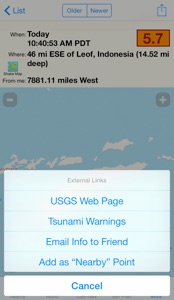
While viewing the detail of any earthquake event, tap the action button in the upper right corner. Choose “Tsunami Warnings” from the menu.
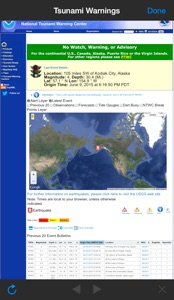
Tsunami warnings originate from two separate web sites, both of which are accessible from the iFeltThat Tsunami Warnings screen. The default site (associated with the “Mainland USA” button at the top) covers Hawaii and North America (Pacific and Atlantic sides); the other site is for South Pacific and Indian Oceans.
Tsunami warnings are fairly rare, but when they occur, you can spot them pretty quickly in the warning pages. The normal state shows a large green box on the page. If the alert status is raised, the color changes accordingly, such as the yellow advisory state shown at the left (scroll up this page to the Pacific warning screen to see its format). Advisories are not issued instantly after the earthquake event. It can often take an hour or more for the status to change. You can also sign up for emailed warnings directly from NOAA (
Mainland USA and
Pacific/Indian Oceans). Given the wide availability of push email solutions for the iPhone (especially with me.com and Gmail), this can simulate notifications and provide faster alerts than if a third party, such as myself, got involved.
Each of the two sites operates differently, but in the case of the one covering Mainland USA, tap the link below the colored box. This leads to a page that includes a table with expected arrival times and wave heights for potentially affected coastlines.